
Getting Started
How to Integrate Testonaut with a Jira Project
Integration overview
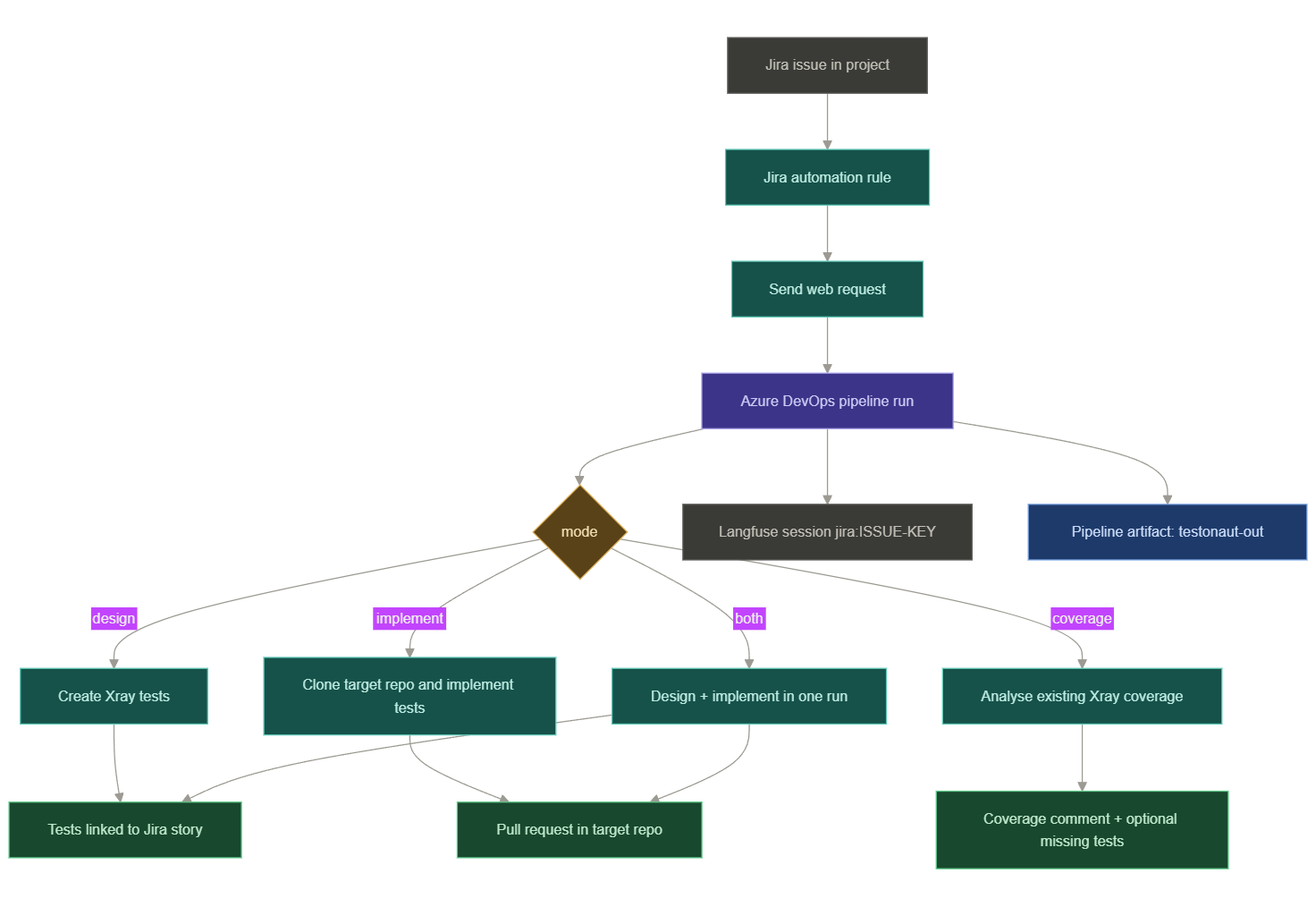
The most important part is the automation rule. The rule sends a JSON payload to the Testonaut runner pipeline, and that payload tells Testonaut which ticket to process, which mode to run, and which git repository to use.
What you need before creating the rule
| Item | Why it is needed |
|---|---|
| Jira project | The rule runs from this project and uses {{issue.key}}. |
| Xray enabled for the project | Testonaut creates Cucumber or Manual tests and links them to the story. |
| Target git repository | Required for implement and both; recommended for design so Testonaut can reuse existing Gherkin steps. |
| Azure DevOps automation PAT | Lets Jira Automation start the pipeline. |
Step 1: Prepare the target repository
Add the Testonaut configuration under the target repo at .agents/testonaut.config.json. The Quick Start covers testonaut init, the readiness check, and the minimal and Docker-backed stack configs in full.
Step 2: Choose the Testonaut runner pipeline
| Pipeline | When to use it | Notes |
|---|---|---|
pipelines/run-hosted.yml | Quick start | Builds Testonaut from source on a Microsoft-hosted agent. No ACR or Azure subscription/RBAC required. |
The pipeline definitions accept these parameters:
| Parameter | Required | Notes |
|---|---|---|
mode | Yes | design, implement, both, or coverage. |
issueKey | Yes | Jira issue key. In automation, use {{issue.key}}. |
targetRepo | For implement / both | Git clone URL for the automation repo. Optional for design/coverage, but recommended for step reuse. |
testFields | No | Escaped JSON string for mandatory Jira/Xray fields. |
reporter | No | Jira accountId, usually {{initiator.accountId}}. |
deriveRequirements | No | true or false; blank means default on. |
adversarialCritique | No | true or false; blank means default on. |
riskCoverage | No | required, warn, or off; blank means default warn. |
Note the pipeline id — you need it for the Jira web request URL:
https://dev.azure.com/afs-dev/riverty-test-automation/_apis/pipelines/2571/runs?api-version=7.1Step 3: Prepare the git automation credentials
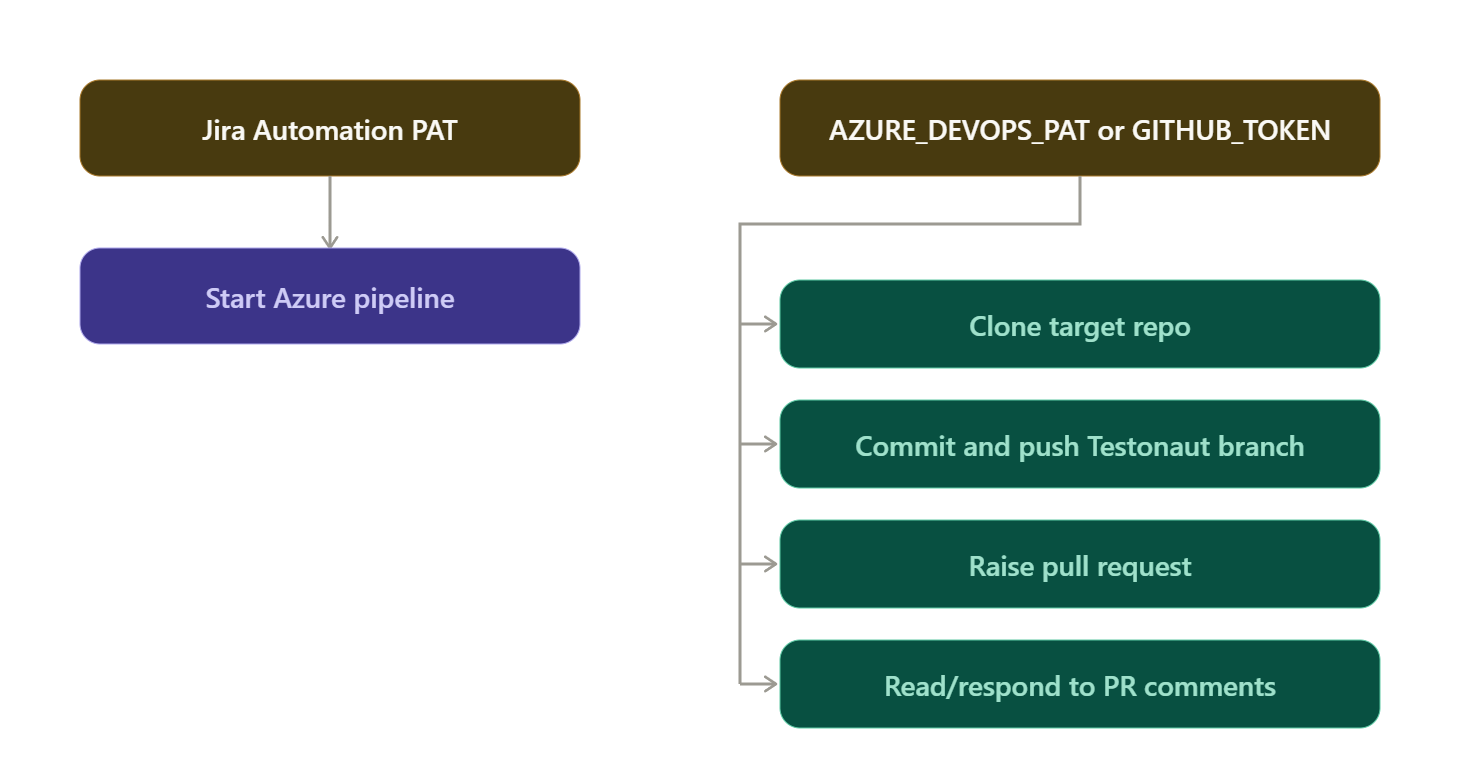
There are two different credentials involved. Keeping them separate makes troubleshooting easier.
| Credential | Used by | Required scopes |
|---|---|---|
| Automation PAT | Jira Automation web request starts the Azure pipeline. | Build/Pipelines Read & execute. |
| Repository PAT | Pipeline clones/pushes/raises PRs in the target repo. | Azure DevOps: Code Read & Write + Pull Request Read & Write. GitHub: contents write + pull request write. |
The pipeline clones the target repository using git -c http.extraHeader so the token does not appear in the remote URL or logs. Clone URL shapes:
# Azure DevOps
https://dev.azure.com/<org>/<project>/_git/<repo>

# GitHub
https://github.com/<owner>/<repo>.git
The runner configures git identity before committing:
git config --global user.email "testonaut-agent@riverty.com"
git config --global user.name "Testonaut Agent"
Step 4: Encode the automation PAT for Jira
Jira Automation must call Azure DevOps with Basic auth. Azure DevOps expects an empty username and the PAT as the password, so encode the string :<PAT> (note the leading colon):
# PowerShell
"Basic " + [Convert]::ToBase64String([Text.Encoding]::ASCII.GetBytes(":PASTE_YOUR_PAT"))

# Bash
printf ':%s' 'PASTE_YOUR_PAT' | base64 | tr -d '\n'
Store the complete value as a Jira Automation secret, for example AZDO_BASIC, and reference it in the rule's Authorization header.
Step 5: Create the Jira Automation rule
In Jira: Project settings → Automation → Create rule. Recommended rule shape:
- Trigger:
Manual. - Condition: issue type is
Story, Task. - Add field: field name
Repo, variable nametargetRepo, optionally with a default repository value. - Action:
Send web request.
Step 6: Configure the Send Web Request action
| Field | Value |
|---|---|
| Web request URL | https://dev.azure.com/afs-dev/riverty-test-automation/_apis/pipelines/2571/runs?api-version=7.1 |
| HTTP method | POST |
| Web request body | Custom data |
| Header | Content-Type: application/json |
| Header | Authorization: Basic {{converted Azure PAT}} |
| Delay subsequent actions until a response is received | Recommended! |
Step 7: Add the JSON request body
Design only
Use this when the transition means "create or update test design in Xray."
{
  "templateParameters": {
    "mode": "design",
    "issueKey": "{{issue.key}}",
    "targetRepo": "https://dev.azure.com/<org>/<project>/_git/<repo>",
    "reporter": "{{initiator.accountId}}",
    "deriveRequirements": "true",
    "adversarialCritique": "true",
    "riskCoverage": "warn"
  }
}
targetRepo is optional for design, but keep it when possible — with a repo, Testonaut can inspect existing Cucumber features and avoid generating duplicate Gherkin steps.
Implement only
Use this after the test design is approved and Xray tests are linked to the story.
{
  "templateParameters": {
    "mode": "implement",
    "issueKey": "{{issue.key}}",
    "targetRepo": "https://dev.azure.com/<org>/<project>/_git/<repo>"
  }
}
Important
implement requires targetRepo. The implementation phase reconstructs the design from linked Xray tests, writes code into the target repo, verifies it, pushes a branch, and raises a PR.Design and implement in one run
{
  "templateParameters": {
    "mode": "both",
    "issueKey": "{{issue.key}}",
    "targetRepo": "https://dev.azure.com/<org>/<project>/_git/<repo>",
    "reporter": "{{initiator.accountId}}",
    "deriveRequirements": "true",
    "adversarialCritique": "true",
    "riskCoverage": "warn"
  }
}
Coverage analysis
Use this for scheduled or manual checks comparing story acceptance criteria against linked Xray tests.
{
  "templateParameters": {
    "mode": "coverage",
    "issueKey": "{{issue.key}}",
    "targetRepo": "https://dev.azure.com/<org>/<project>/_git/<repo>",
    "reporter": "{{initiator.accountId}}"
  }
}
Step 8: Add project-mandatory Xray fields
Some Jira/Xray projects require extra fields when creating a Test issue. Add them through testFields. Because Azure pipeline parameters are strings, testFields must be an escaped JSON string:
{
  "templateParameters": {
    "mode": "design",
    "issueKey": "{{issue.key}}",
    "targetRepo": "https://dev.azure.com/<org>/<project>/_git/<repo>",
    "testFields": "{\"customfield_15714\": 170}",
    "reporter": "{{initiator.accountId}}"
  }
}
How to find the field:
- Find the project's Xray Test/Test Case issue type id.
- Query Jira create metadata for that project and issue type.
- Look for required fields and their allowed values.
- Add the write value to
testFields.
| Field type | Example write value |
|---|---|
| Tempo Account number | {"customfield_15714": 170} |
| Select field by id | {"customfield_12345": {"id": "10010"}} |
| Select field by value | {"customfield_12345": {"value": "Regression"}} |
If Jira returns an error like "operation value must be a number," the field id is probably correct but the value shape is wrong.
Step 9: Recommended rule set
For most Jira projects, create separate rules instead of one rule doing everything:
| Rule | Suggested trigger | Pipeline mode | Requires targetRepo |
|---|---|---|---|
| Generate tests | Story transitions to Ready for Test | design | Recommended, not required. |
| Implement tests | Story transitions to Test Design Approved | implement | Yes. |
| Full handover | Story transitions to Ready for Automation | both | Yes. |
| Coverage check | Manual or scheduled | coverage | Recommended. |
This separation keeps the workflow predictable. The implementation rule does not need artifacts from the design rule because it reconstructs the test design from the Xray tests linked to the Jira story.
Step 10: Verify the integration
- Trigger the rule on a test story and check the Jira Automation Audit Log.
- Confirm the web request returned 200 or 201 from Azure DevOps.
- Open Azure DevOps and confirm a new pipeline run started with the expected mode, issueKey, and targetRepo.
- For
design, confirm Xray tests are created and linked to the story as is tested by. - For
implementorboth, confirm a branch and PR were created in the target repo. - Open Langfuse and confirm a session exists for
jira:<ISSUE-KEY>. - Download the
testonaut-outpipeline artifact and inspectcontext.json,test-design.json,implementation.json,audit-log.jsonl, andcost-ledger.jsonl.
Troubleshooting
| Symptom | Likely cause | Fix |
|---|---|---|
| Jira rule gets 401 from Azure DevOps | Basic auth header encoded incorrectly or PAT lacks pipeline scope. | Encode :<PAT> with the leading colon and use Build/Pipelines Read & execute. |
| Pipeline starts but cannot clone repo | Missing or insufficient AZURE_DEVOPS_PAT / GITHUB_TOKEN. | Add a repo token to testonaut-secrets with clone/push/PR permissions. |
| implement fails immediately | Missing targetRepo. | Add the target repo clone URL to the JSON body. |
| implement finds no tests | Story has no linked Xray tests. | Run design first or use both. |
| Duplicate tests are created | Rule fires repeatedly. | Trigger on a specific transition only; avoid Issue updated. |
| Xray create fails on a required field | Missing testFields or wrong value shape. | Query Jira create metadata and send the correct field id/value. |
| No PR is created | Git identity/token/remote issue, or no changed files. | Check pipeline logs, implementation.md, and audit-log.jsonl. |
| No Langfuse session | Telemetry variables missing or network egress blocked. | Check OTEL_ENABLED, OTEL_PROVIDER, keys, endpoint, and the Langfuse egress step. |
| Docker verify fails | Target stack is not hermetic on the runner. | Ensure compose builds from the repo, publishes ports, has secrets, and uses a realistic readinessTimeoutMs. |
Final checklist
Before enabling the rule for the whole project, confirm:
.agents/testonaut.config.jsonexists in the target repo.- The runner pipeline exists and has a known pipeline id.
testonaut-secretscontains Jira, Xray, LLM, VCS, and Langfuse variables.- Jira Automation has the encoded Azure DevOps Basic auth secret.
- The automation rule uses
POSTandContent-Type: application/json. - The request body includes
mode,issueKey, and the correcttargetRepofor implementation runs. - Required Xray fields are provided in
testFieldsif the project needs them. - The rule trigger cannot fire repeatedly for the same design event.
- A test run creates linked Xray tests and, for implementation, a PR in the target repo.